
How Blocking Works
hisThis page explains how the Block feature works on Front Page and how it affects interactions between users.
The Block feature allows users to protect their privacy and control who can interact with them on the platform.
When you block someone, they will no longer be able to view your profile, interact with your posts, or contact you through Front Page.
Scenario 1 – Accessing the Block Option
Users can block another user directly from their profile page.
Steps:
Open the user’s profile page.
Click the three-dot menu (⋮) on the profile.
Select Block.
Figure 1:
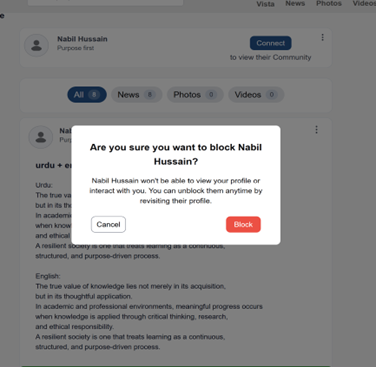
Block Option from Profile Menu
This figure shows the menu where a user can select the Block option from the profile settings.
Result of Blocking a User
After a user is blocked:
The blocked user cannot view your profile.
The blocked user cannot see your posts or stories.
The blocked user cannot interact with your content.
The blocked user cannot send messages or connection requests.
What Happens After Blocking
The blocked user will not receive a notification that they were blocked.
Any existing connection between the users may be removed depending on platform settings.
The blocked user will no longer be able to search for or access your profile normally.
Blocking helps maintain a safe and controlled environment for users on the platform.