
Blocking Users
This page explains how the Block feature works on Front Page and how it affects interactions between users.
The Block feature allows users to protect their privacy and control who can interact with them on the platform.
When youa blockuser blocks someone, theyinteraction willvisibility nobetween longerboth beusers ablebecomes torestricted viewacross your profile, interact with yourprofiles, posts, orcomments, contactreplies, youand through Front Page.reactions.
Scenario 1 –
Accessing the Block Option
Users can block another user directly from their profile page.
Steps:
- Open the user’s profile
page.page. - Click or tap the three-dot ellipses menu (⋮)
on the profile.. - Select Block.
Figure 1:
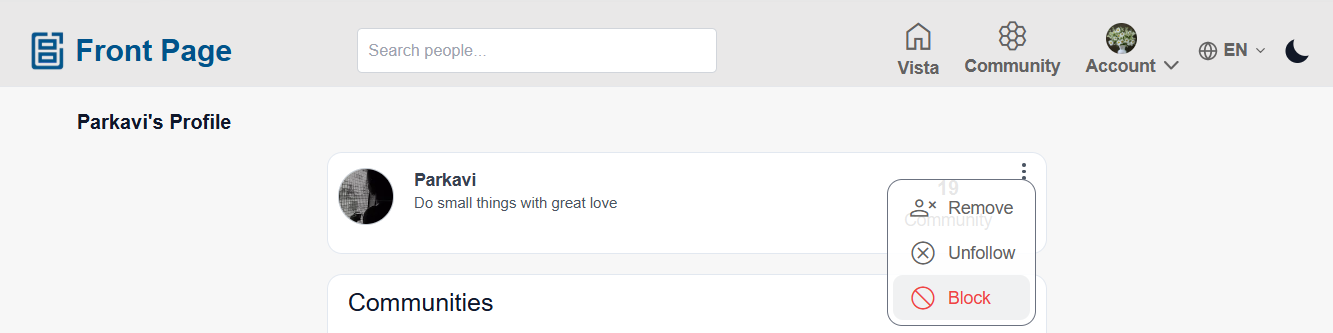
Block Option from Profile Menu
This figure shows the menu where a user can select the Block option from the profile settings.
Result of Blocking a User
After a user is blocked:
- The blocker can no longer see:
- Previous reactions made by the blocked user
- Comments
viewmadeyourbyprofile.the blocked user - Replies made by the blocked user
on their posts.
cannot - The blocked user can no longer see:
- Previous reactions made by the blocker
- Comments made by the blocker
- Replies made by the blocker
on their posts.
- Both users cannot see
youreach other’s:- Reactions
- Comments
- Replies
on third-user postsor(postsstories.created Thebyblockedotherusercannot interact with your content.The blocked usercannot send messages or connection requestsusers).
- Other users can still see all previous interactions between both blocked users.
Community and Post Visibility After Blocking
Blocking does not completely remove visibility inside shared communities.
If both users are members of the same community:
- Community posts created before blocking may still remain visible based on community visibility settings.
- Previously shared community posts may still be visible.
However:
- Blocked users cannot interact directly with each other.
- They cannot see each other’s:
- Reactions
- Comments
- Replies
- Blocked users cannot create new community interactions directly with each other after blocking.
What Happens After Blocking
- The blocked user will not receive a notification that they were blocked.
AnyExistingexistingdirectconnectioninteractionbetweenvisibilitythebecomesusers may be removed depending on platform settings.restricted.The blocked user will no longer be able to search for or access your profile normally.
Blocking helps maintain a safesafer and more controlled environment for users on the platform.