
How Unfollow and Remove Work
This page explains how Unfollow and Remove work on Front Page and how these actions affect the connection between two users.
Users can manage their connections in two ways:
-
Unfollow – Stop seeing another user’s posts in your feed.
-
Remove – Remove someone from your followers list or leave a community connection.
Before Any Action
Before any action is taken:
-
User A follows User B ✅
-
User B follows User A ✅
Both users are mutual followers and can see each other’s posts depending on their account privacy settings.
Scenario 1 – Viewing a User Profile
Users can open another user's profile to view their posts and access connection options.
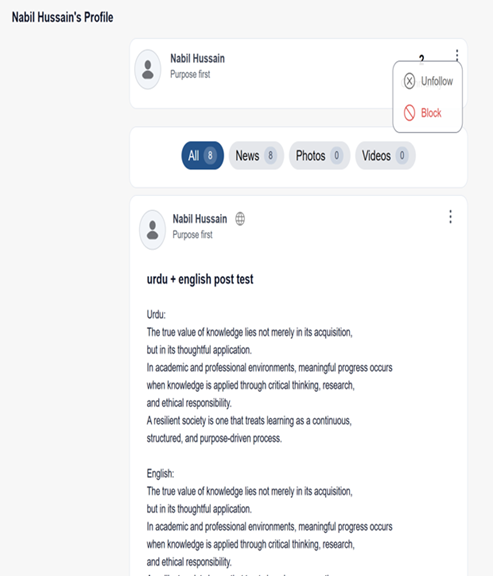
Figure 1: User Profile Page
This figure shows a user's profile page where posts, photos, and other content are displayed. From this page, users can interact with the profile and access additional options such as follow settings.
Scenario 2 – Unfollow a User
If User A chooses to unfollow User B, they can do so from the profile menu.
Steps:
-
Go to the user’s profile page.
-
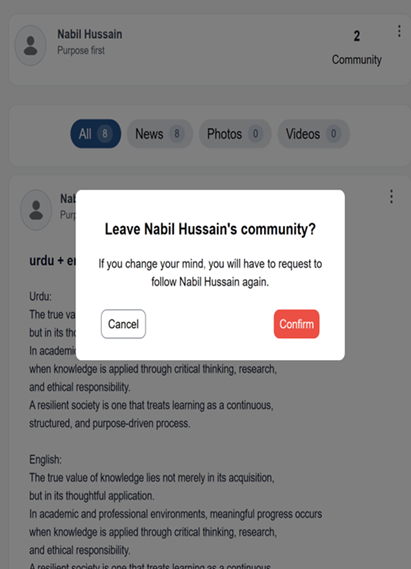
Click the three-dot menu (⋮).
-
Select Unfollow.
Figure 2: Unfollow Option
This figure shows the menu option where a user can select Unfollow from the profile settings to stop following another user.
Result
-
A → B: ❌ (A no longer follows B)
-
B → A: ✅ (B still follows A)
What Happens
-
User B does not receive a notification that A unfollowed.
-
A will no longer see B’s posts or stories in their feed.
-
B may still see A’s posts if A’s account is public or if B was already an approved follower.
This becomes a one-sided follow.
Scenario 3 – Leaving a Community / Removing a Connection
If a user decides to leave a community or remove a connection, a confirmation message will appear.
Steps:
-
Select the Leave Community or Remove option.
-
A confirmation dialog appears.
-
Click Confirm to proceed.
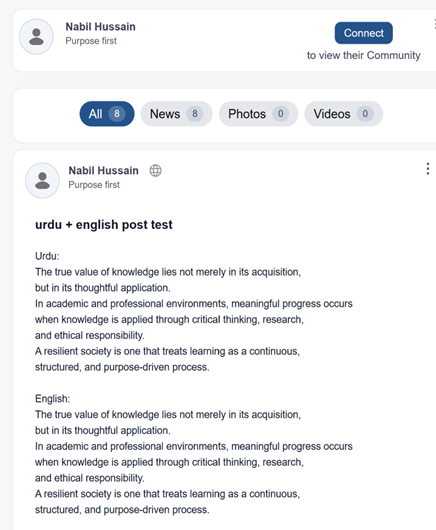
Figure 3: Leave Community Confirmation
This figure shows the confirmation dialog that appears when a user chooses to leave a community. The user must confirm the action before the connection is removed.
Result
-
The connection between the users is removed.
What Happens
-
The action happens without sending a notification to the other user.
-
Access to content will depend on the privacy settings of the account.